
안녕하세요! NestJS를 사용해 HTTP 포트(3000번)와는 별개로 두 개 이상의 독립적인 WebSocket 서버를 운용하는 방법을 찾고 계시는군요.
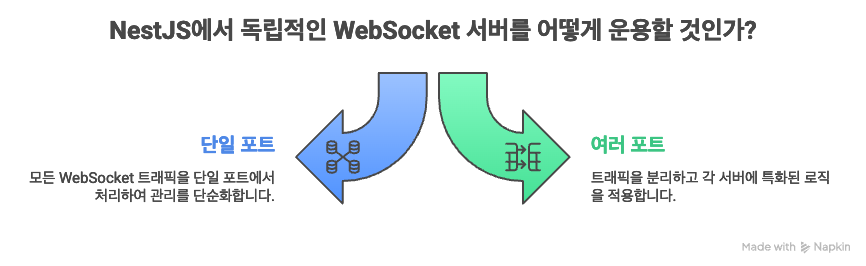
두 개의 다른 포트(예: 4000번과 4001번)에서 WebSocket Gateway를 구동하는 것은 서비스별로 트래픽을 분리하거나, 각 Gateway에 특화된 로직을 적용할 때 매우 유용합니다.
주어진 시나리오를 바탕으로, 서버 모니터링(4000번)과 별도의 실시간 알림(4001번)을 처리하는 두 개의 Gateway를 분리하여 구동하는 예제를 보여드리겠습니다.
🛠️ 1단계: Gateway 클래스 생성 및 설정
두 개의 독립적인 WebSocket 서버를 구동하기 위해 각각 다른 포트를 지정하는 두 개의 Gateway 클래스를 생성합니다.
1. Monitoring Gateway (4000번 포트)
이전 예시와 동일하게 서버의 상태를 2초마다 푸시하는 Gateway입니다. @WebSocketGateway 데코레이터에 4000번 포트를 지정합니다.
// src/monitoring/monitoring.gateway.ts

import { WebSocketGateway, WebSocketServer, OnGatewayInit } from '@nestjs/websockets';
import { Server } from 'socket.io';
import * as os from 'os';

@WebSocketGateway(4000, { // 👈 4000번 포트 지정
  cors: { origin: '*' },
})
export class MonitoringGateway implements OnGatewayInit {
  @WebSocketServer() server: Server;
  private interval: NodeJS.Timeout | null = null;

  afterInit() {
    console.log('[4000] Monitoring Gateway Started.');
    this.interval = setInterval(() => {
      // 서버 상태 계산 로직 (CPU, 메모리 등)
      const stats = {
        cpu: Math.floor(Math.random() * 50) + 10, // 임시 데이터
        timestamp: new Date().toLocaleTimeString(),
      };
      // 'serverStats' 이벤트로 전송
      this.server.emit('serverStats', stats);
    }, 2000);
  }
  // ... (handleConnection, handleDisconnect 등 생략)
}
2. Notification Gateway (4001번 포트)
사용자에게 실시간 알림을 보내는 역할을 하는 새로운 Gateway입니다. 4001번 포트를 지정합니다.
// src/notification/notification.gateway.ts

import { WebSocketGateway, WebSocketServer, OnGatewayConnection, SubscribeMessage, MessageBody } from '@nestjs/websockets';
import { Server, Socket } from 'socket.io';

@WebSocketGateway(4001, { // 👈 4001번 포트 지정
  cors: { origin: '*' },
})
export class NotificationGateway implements OnGatewayConnection {
  @WebSocketServer() server: Server;

  handleConnection(client: Socket) {
    console.log(`[4001] Notification Client connected: ${client.id}`);
    // 연결 성공 시, 클라이언트에게 알림 이벤트 전송
    client.emit('systemAlert', '새로운 알림 서버에 접속하셨습니다!');
  }

  // 클라이언트로부터 'sendNotification' 이벤트를 받았을 때 처리하는 핸들러
  @SubscribeMessage('sendNotification')
  handleMessage(@MessageBody() data: string) {
    console.log(`[4001] Received message: ${data}`);
    // 이 클라이언트가 보낸 메시지를 모든 연결된 클라이언트에게 브로드캐스트
    this.server.emit('newNotification', `📣 새로운 공지: ${data}`);
    return 'Notification sent!';
  }
}
📝 2단계: AppModule에 등록
생성된 두 Gateway를 AppModule의 providers 배열에 등록합니다. NestJS는 등록된 Gateway의 포트 설정을 확인하고, 각 포트별로 독립적인 서버를 생성하여 구동합니다.
// src/app.module.ts

import { Module } from '@nestjs/common';
import { MonitoringGateway } from './monitoring/monitoring.gateway';
import { NotificationGateway } from './notification/notification.gateway';

@Module({
  imports: [],
  controllers: [],
  providers: [
    MonitoringGateway, // 4000번 포트 서버 구동
    NotificationGateway, // 4001번 포트 서버 구동
    // ... 다른 서비스 및 프로바이더
  ],
})
export class AppModule {}
🚀 3단계: HTTP 서버 구동 (3000번 포트)
main.ts는 여전히 HTTP 서버를 구동하는 역할만 담당합니다. 두 WebSocket 서버는 이미 Gateway 클래스에서 포트를 지정했기 때문에 자동으로 독립 구동됩니다.
// src/main.ts

import { NestFactory } from '@nestjs/core';
import { AppModule } from './app.module';

async function bootstrap() {
  const app = await NestFactory.create(AppModule);
  app.enableCors({ origin: '*', credentials: true });

  const httpPort = 3000;
  await app.listen(httpPort);

  console.log(`--- Server Status ---`);
  console.log(`✅ HTTP/REST API Server on: http://localhost:${httpPort}`);
  console.log(`✅ Monitoring WS Server on: ws://localhost:4000`);
  console.log(`✅ Notification WS Server on: ws://localhost:4001`);
  console.log(`-----------------------`);
}
bootstrap();
🌐 4단계: 클라이언트 연결 및 테스트

서버를 실행하면 (npm run start:dev), 클라이언트 측에서는 목적에 따라 포트를 명확히 구분하여 연결해야 합니다.
| 통신 목적 | 클라이언트 연결 주소 |
| 서버 모니터링 | http://localhost:4000 |
| 실시간 알림 | http://localhost:4001 |
| REST API 요청 | http://localhost:3000/users |
클라이언트 테스트 코드 예시
// Monitoring 클라이언트 (4000번)
const monitoringSocket = io('http://localhost:4000');
monitoringSocket.on('connect', () => console.log('Monitoring Connected to 4000'));
monitoringSocket.on('serverStats', (data) => {
    console.log(`[4000] 서버 상태 수신: CPU ${data.cpu}% at ${data.timestamp}`);
});

// Notification 클라이언트 (4001번)
const notificationSocket = io('http://localhost:4001');
notificationSocket.on('connect', () => console.log('Notification Connected to 4001'));
notificationSocket.on('systemAlert', (msg) => console.log(`[4001] 알림: ${msg}`));
notificationSocket.on('newNotification', (msg) => console.log(`[4001] 브로드캐스트 알림 수신: ${msg}`));

// 4001번 서버로 알림 메시지 전송 테스트
setTimeout(() => {
    notificationSocket.emit('sendNotification', '새로운 긴급 패치가 배포되었습니다.');
}, 5000);
이렇게 포트를 명시적으로 분리하여 사용하면, 서비스의 확장성과 안정성을 높일 수 있습니다.
'Nest.js를 배워보자' 카테고리의 다른 글
| ✨ Prisma 7과 NestJS, MySQL로 시작하기: 차세대 ORM 가이드 (1) | 2025.12.09 |
|---|---|
| 💡 NestJS에서 Gateway란? (0) | 2025.12.05 |
| NestJS와 텔레그램 연동 (0) | 2025.12.03 |
| NestJS와 텔레그램 연동 실습 중심 목차 (N화 구성) (0) | 2025.12.03 |
| Next.js 서버 헬스 모니터링: 안정적인 서비스 운영을 위한 필수 전략 (0) | 2025.12.03 |